
 Tweet
Tweet
I've having trouble getting Visual Studio 2005 set up properly . I was using the instructions for the free version of studio, so that may be the problem. When I try to compile I get this error:
The log shows:
My current setup is:
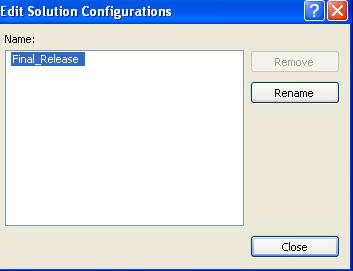
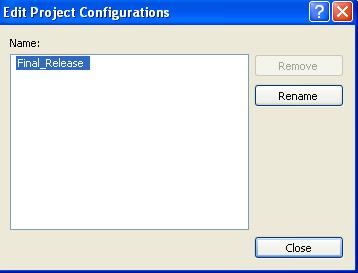
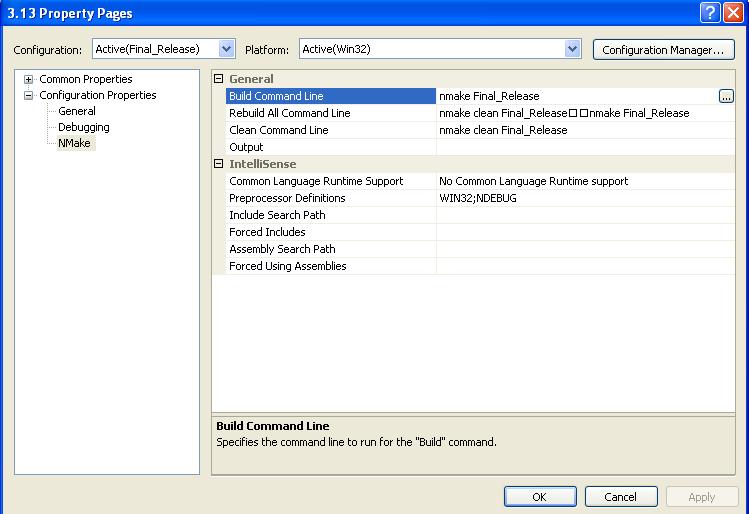
Any thoughts or ideas?
1>------ Build started: Project: 3.13, Configuration: Final_Release Win32 ------
1>Performing Makefile project actions
1>Microsoft (R) Program Maintenance Utility Version 8.00.50727.42
1>Copyright (C) Microsoft Corporation. All rights reserved.
1>NMAKE : fatal error U1052: file 'Final_Release' not found
1>Stop.
1>Project : error PRJ0019: A tool returned an error code from "Performing Makefile project actions"
1>Build log was saved at "file://g:\Documents and Settings\Methos\My Documents\HoF Staff\Working\3.13\Final_Release\BuildLog.htm"
1>3.13 - 2 error(s), 0 warning(s)
========== Build: 0 succeeded, 1 failed, 0 up-to-date, 0 skipped ==========
1>Performing Makefile project actions
1>Microsoft (R) Program Maintenance Utility Version 8.00.50727.42
1>Copyright (C) Microsoft Corporation. All rights reserved.
1>NMAKE : fatal error U1052: file 'Final_Release' not found
1>Stop.
1>Project : error PRJ0019: A tool returned an error code from "Performing Makefile project actions"
1>Build log was saved at "file://g:\Documents and Settings\Methos\My Documents\HoF Staff\Working\3.13\Final_Release\BuildLog.htm"
1>3.13 - 2 error(s), 0 warning(s)
========== Build: 0 succeeded, 1 failed, 0 up-to-date, 0 skipped ==========
Build Log
Build started: Project: 3.13, Configuration: Final_Release|Win32
Command Lines
Creating temporary file "G:\DOCUME~1\DUSTIN~1\LOCALS~1\Temp\BAT000001574021 96.bat" with contents
[
@echo off
nmake Final_Release
if errorlevel 1 goto VCReportError
goto VCEnd
:VCReportError
echo Project : error PRJ0019: A tool returned an error code from "Performing Makefile project actions"
exit 1
:VCEnd
]
Creating command line "G:\DOCUME~1\DUSTIN~1\LOCALS~1\Temp\BAT000001574021 96.bat"
Output Window
Performing Makefile project actions
Microsoft (R) Program Maintenance Utility Version 8.00.50727.42
Copyright (C) Microsoft Corporation. All rights reserved.
NMAKE : fatal error U1052: file 'Final_Release' not found
Stop.
Project : error PRJ0019: A tool returned an error code from "Performing Makefile project actions"
Results
Build log was saved at "file://g:\Documents and Settings\Dustin Stark\My Documents\HoF Staff\Working\3.13\Final_Release\BuildLog.htm"
3.13 - 2 error(s), 0 warning(s)
Build started: Project: 3.13, Configuration: Final_Release|Win32
Command Lines
Creating temporary file "G:\DOCUME~1\DUSTIN~1\LOCALS~1\Temp\BAT000001574021 96.bat" with contents
[
@echo off
nmake Final_Release
if errorlevel 1 goto VCReportError
goto VCEnd
:VCReportError
echo Project : error PRJ0019: A tool returned an error code from "Performing Makefile project actions"
exit 1
:VCEnd
]
Creating command line "G:\DOCUME~1\DUSTIN~1\LOCALS~1\Temp\BAT000001574021 96.bat"
Output Window
Performing Makefile project actions
Microsoft (R) Program Maintenance Utility Version 8.00.50727.42
Copyright (C) Microsoft Corporation. All rights reserved.
NMAKE : fatal error U1052: file 'Final_Release' not found
Stop.
Project : error PRJ0019: A tool returned an error code from "Performing Makefile project actions"
Results
Build log was saved at "file://g:\Documents and Settings\Dustin Stark\My Documents\HoF Staff\Working\3.13\Final_Release\BuildLog.htm"
3.13 - 2 error(s), 0 warning(s)
Any thoughts or ideas?

Comment